🎮 FFXIV Voice Limiter
The FFXIV Voice Limiter is a passive analyser plus two visualisers that surface voice-count and note-rate hot-spots in real time so you can see where your arrangement would be silently degraded by the FFXIV Bard Performance audio engine before you ever upload it to the game.
💡 Find it in: the toolbar gauge 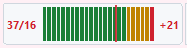 ,
the optional voice-load lane under the velocity strip, and the
MidiPilot
,
the optional voice-load lane under the velocity strip, and the
MidiPilot analyze_voice_load agent tool.
The widgets are hidden when FFXIV SoundFont Mode is off so non-FFXIV users pay zero perf cost.

FFXIV Voices panel + voice-load lane: live load against the 16-voice ceiling.
Why this exists - the constraints
In FFXIV's Performance Mode the in-game audio engine has hard, observable ceilings that silently truncate or drop notes from the player's arrangement. The MIDI looks fine; what comes out of the game does not. Three constraints matter for arranging:
| Constraint | Limit | Symptom in-game |
|---|---|---|
| Polyphony / voice ceiling | 16 active voices total, across the whole ensemble (not per player) | Older notes get cut off; wind / brass becomes inaudible during dense passages. |
| Note rate | ≤ 14 notes / second per channel, ~50 ms minimum interval (locked-60 fps assumption) | Notes beyond the rate are dropped or merged. |
| Range | C3..C6 (MIDI 48..84) | Out-of-range notes are auto-transposed by the client. |
| No native chords | One key press = one note; arpeggiate or use Power Chord instruments | Different pitches starting on the same tick are rolled as a fast arpeggio; the same pitch stacked twice sounds once and the copy is wasted. |
The FFXIV Channel Fixer sets up channels, programs and velocities, and the Bard accuracy path reproduces the in-game playback behaviour. Check FFXIV Playability is where range and the chord and stacked-note rules get reported, with the offending notes clickable. The Voice Limiter adds predictive feedback on the polyphony ceiling and the note-rate ceiling while you are editing.
Thresholds - relaxed from the documented hard ceiling
The visualiser uses three colour bands. They are intentionally relaxed compared to the documented 16-voice hard ceiling because empirical in-game testing (and MogNotate observations) shows the engine tolerates short bursts above 16 thanks to release-tail truncation. The analyser still reports the raw count and overflow against the documented 16 for the AI tool.
≤ 18 voices - Green
Comfortable headroom. The game will reliably play every note.
19 - 23 voices - Yellow
Borderline. Short bursts usually survive; sustained passages may drop tail notes.
≥ 24 voices - Red
Game will drop notes audibly. Thin out the chord, arpeggiate, or move a voice to a different player.
| Measurement | Value |
|---|---|
| Documented voice ceiling | 16 voices total (used as the dashed red line + AI overflow reference) |
| Note-rate ceiling | 14 notes / second / channel |
| Note-rate sliding window | 250 ms (configurable 100 ms - 1000 ms) |
| Yellow-warn threshold | 13 voices (configurable 1 - 15) |
| Re-analyse debounce | 100 ms after Protocol::actionFinished |
| Live-update cadence (during playback) | ~30 Hz, piggybacking on the playback timer |
The toolbar gauge
A compact ~120×25 px LED-style widget that sits next to the Lyric Visualizer and MIDI Visualizer:
- Left readout -
N / 16, the live voice count at the playhead. - 24-segment LED meter - stereo-style bar that fills green → yellow → red as voice count rises. A dedicated tick mark sits at the documented 16-voice ceiling.
- Right overflow slot -
+0(green) or e.g.+3(red), the count of voices over the documented ceiling at the playhead. - Tooltip -
Voices: 14 / 16 (max in piece: 22 at bar 17 beat 3.2). - Click - toggles the piano-roll voice-load lane.
- Auto-bind - visible only when FFXIV SoundFont Mode is on. Same idiom as the existing X|V toolbar widget.
The toolbar gauge: N/16 readout, 24-LED meter, ceiling tick, overflow slot.
The voice-load lane
A companion lane to the existing velocity strip, toggled from View → Show Voice Lane (or by clicking the toolbar gauge):
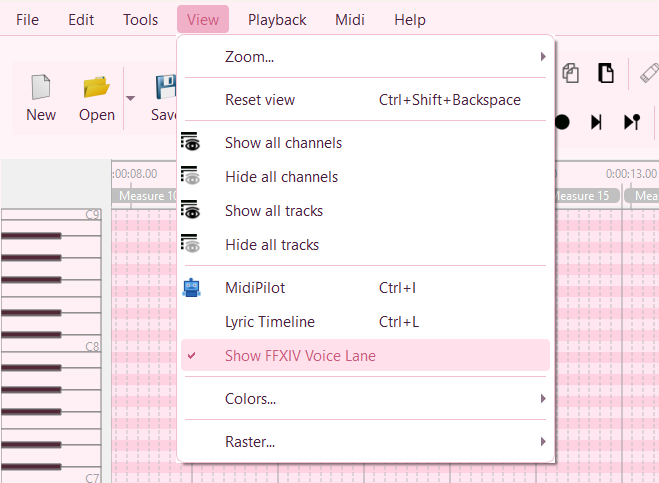
View → Show Voice Lane - the same toggle is fired by clicking the toolbar gauge.
- Auto-scaled Y axis - bars rise as voice count rises, sampled per pixel column (or per beat, whichever is finer at the current zoom).
- Soft / red threshold colouring - bars are green ≤ 18, yellow 19-23, red ≥ 24, matching the gauge.
- Per-channel rate hot-spot strip - thin red verticals mark any 250 ms window that exceeds 14 notes/s on a single channel.
- Dashed red ceiling line - drawn on top with a subtle halo and a 16 label so the documented hard ceiling is always visible no matter what zoom you're at.
- Click a column - scrolls / cursors the matrix to that tick, same idiom as the protocol panel's Jump to event entries.
The analyser engine
A headless FfxivVoiceAnalyzer backs all three surfaces (gauge, lane, AI tool). It
runs once per file (cached, debounced) and again on every
Protocol::actionFinished - so a multi-event paste or agent tool call only
triggers one rebuild.
| Output | What it is |
|---|---|
voiceCountAtTick |
Sparse (tick, count) snapshots taken at every NoteOn/NoteOff transition across
the 16 standard MIDI channels (skips meta channels 16/17/18). Built in a single pass. |
peakInBar(barIndex) |
Convenience derived from the snapshots, used by the bar-level overlays. |
RateHotspot[] |
{ channel, startTick, endTick, notesPerSecond } entries for any 250 ms
sliding window exceeding 14 notes/s on a single channel. |
globalPeak |
The overall maximum simultaneous voice count anywhere in the file. |
Sample-tail simulation
A naive NoteOn..NoteOff window under-reports voice load on plucked instruments (harp,
lute, archlute, all guitar variants) because the audible release tail still occupies an engine
voice after the OffEvent has already fired. FfxivVoiceLoadCore::sampleTailMs()
extends each note's audible window by an estimated release per General-MIDI family and per drum
pitch so the visualiser matches what you actually hear in-game (and what MogNotate measures).
This is why the gauge can read higher than a quick mental sum of overlapping NoteOns -
it's the right answer.
Drum-channel handling
A kick + snare hit on CH9 is two simultaneous voices in the in-game engine, not one. CH9 is counted exactly like every other channel; no special-casing.
Settings
Settings → MIDI → FFXIV → Voice Limiter:
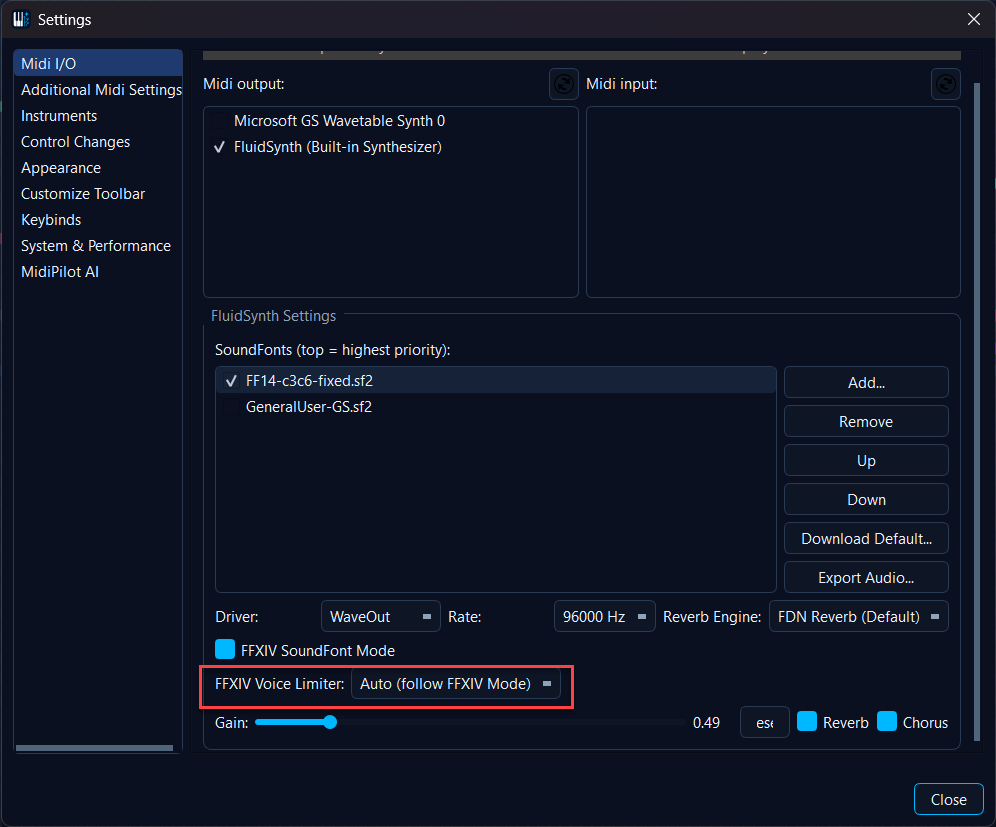
The Voice Limiter group sits inside the FFXIV settings block and auto-binds to FFXIV SoundFont Mode - turn FFXIV Mode on and the analyser plus both visualisers come along; turn it off and they go away again. A manual override is remembered per install.
| Setting | Default | Notes |
|---|---|---|
| Enable Voice Awareness widgets | On (when FFXIV Mode is on) | Auto-bound to FFXIV SoundFont Mode the same way the bard-accurate-mode auto-bind
works. Manually unchecking it while FFXIV Mode is on persists the
OFF choice (FFXIV/voiceLimiter/userOverride = "off"); clearing the override or
a fresh install restores the auto-bound behaviour. |
| Voice ceiling | 16 | Read-only - matches the game. |
| Yellow-warn threshold | 13 | Spinner 1-15. |
| Note-rate ceiling | 14 notes/s | Read-only. |
| Note-rate window | 250 ms | Spinner 100-1000 ms. |
All persisted under FFXIV/voiceLimiter/*.
Fixing what the analysis finds
The limiter is read-only: it shows you where a file is too heavy. The tool that acts on that is Auto-Fit Voice Load - it thins overloaded moments and over-dense passages, always with a dry run and your confirmation first, in a single undo step. It has its own page, because it works on any MIDI file and not only in FFXIV mode.
Two things tie it to the limiter. First, the voice-load lane is one of its entry points: right-click an overflow range or a rate-hotspot marker to open the tool scoped to exactly that range. Second, while its dialog is open, the lane becomes a before/after picture - the full load in grey with the predicted result drawn on top in colour, updating as the settings change.
One counting difference is worth knowing when you compare the two. The gauge and the lane count ringing voices - notes plus their sample tails - which is the honest model for a display. For editing that is far too strict, because removing a note whose tail merely overlaps changes nothing you can hear. Auto-Fit therefore counts notes that really sound at the same time, so a file whose gauge peak looks dramatic may well be left alone as fine.
The lane doubles as a track-share display on its own, too: while any track is hidden in the Tracks panel, the full curve turns grey and the visible tracks' share is drawn in colour on top - toggle tracks on and off to see exactly how much each one contributes to the load.
AI tools - analyze_voice_load and auto_fit_voice_load
The agent gets a read-only analyze_voice_load(start_tick, end_tick) tool that
returns:
globalPeak- the highest simultaneous voice count in the range.overflowRanges[]- tick ranges where simultaneous voices exceed 16.rateHotspots[]- per-channel{channel, startTick, endTick, notesPerSecond}entries that breach the 14 notes/s/channel ceiling.
When FFXIV Mode is on, the agent's activeConstraints banner pins the reminder
"FFXIV: ≤16 voices, ≤14 notes/s/channel, C3..C6" so the model self-checks its
output against the engine ceilings every turn and rewrites dense passages without needing to be
asked.
The matching action tool auto_fit_voice_load lets the agent apply the same thinning
the Auto-Fit Voice Load dialog does. It defaults to a dry
run: the agent first reports what would be removed and must ask for your confirmation before
running the real pass, which is one undo step - the same always-ask rule the dialog enforces.
Demo
Live voice load updates as the playhead moves through a dense ensemble piece.