 Fix X|V Channels - FFXIV Channel Fixer
The Fix X|V Channels tool provides a one-click, deterministic channel fixer that sets up the complete MidiBard2 channel mapping for FFXIV Bard Performance. It requires no AI calls, no API key, and works fully offline.
💡 Find it in: Toolbar button or menu Tools → Fix X|V Channels
How It Works
The fixer analyzes your MIDI file by track name, auto-detects the best mode, and applies a 5-step algorithm to set up all channel assignments and program changes. The entire operation is wrapped in a single undo action.
1️⃣ Analyze
Scans all tracks and identifies FFXIV instruments by track name. Counts existing program changes and guitar variants.
Before anything is changed, the fixer checks that the file is an FFXIV MIDI: every track that contains notes must be named after an FFXIV instrument. If some are not, the fixer stops and lists them by track number and name so you can rename them first; tracks without notes (tempo, title or empty tracks) are ignored, and a General MIDI drum track that plays on the percussion channel (CH9) is accepted as it is. Rebuild (Full Reassignment) is only offered while every melodic track with notes sits within the first 16 tracks, because MIDI has 16 channels - larger files can still use Preserve (Minimal Changes). The File Analysis box shows how many tracks contain notes and how many of those are not FFXIV instruments.
2️⃣ Clean
Removes existing program_change events. Rebuild mode removes all; Preserve mode removes only guitar channels.
3️⃣ Migrate
Assigns each track a unique MIDI channel (T0→CH0, T1→CH1, etc.). Percussion goes to CH9, and CH9 stays with the percussion: a melodic track at track index 9 takes the next free channel. Guitar tracks get 5 channels for variant switching.
4️⃣ Program
Inserts correct program_change events at tick 0 for every channel on every track. Preserve mode also detects mid-song guitar variant switches and inserts PCs at switch points.
5️⃣ Report
Shows a rich HTML result summary with channel mapping table, removed/inserted program changes, track renames, and undo hint.
Two Modes
When you click Fix X|V Channels, a confirmation dialog appears with two modes. The tool auto-detects the best mode based on your file, but you can override the selection.
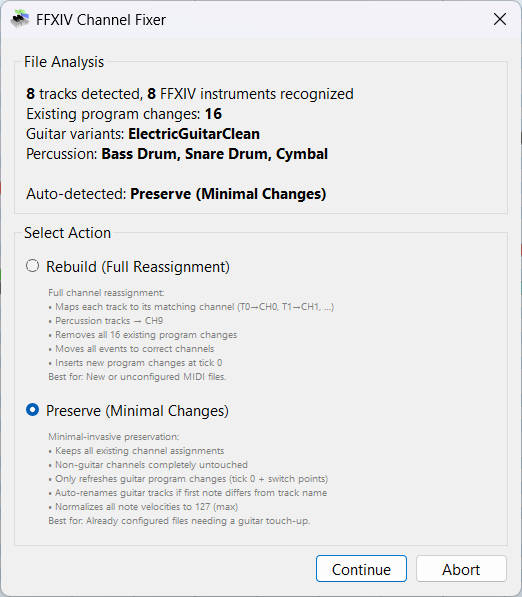
| Mode | What It Does | Best For |
|---|---|---|
| 🔄 Rebuild (Full Reassignment) |
|
New or unconfigured MIDI files, files exported from a DAW, files with scrambled channels |
| 🛡️ Preserve (Minimal Changes) |
|
Already configured files needing a guitar touch-up, files after manual note editing, files partially fixed by MidiPilot AI |
Auto-Detection Logic
The tool auto-selects the mode based on these criteria:
- Rebuild is selected when the file has FFXIV instrument names but no guitar program at the start of the song
- Preserve is selected when a channel starts with a guitar program, or when a guitar track has notes on more than one guitar channel (indicating a pre-configured file)
MidiPilot and MCP clients (setup_channel_pattern) choose the mode by the same rules, so the dialog proposes the mode they would run.
Optional: Re-sync Non-Guitar Instruments (Preserve mode)
When you rename a track to a different instrument - say Trumpet becomes Trombone - the track name changes, but the channel's program change still plays the old instrument. Preserve mode has an optional checkbox for exactly this case:
☑️ Re-sync non-guitar channel instruments from track names - rewrites a channel's program change at tick 0 when it no longer matches the track name. Available under the Preserve mode selection; off by default.
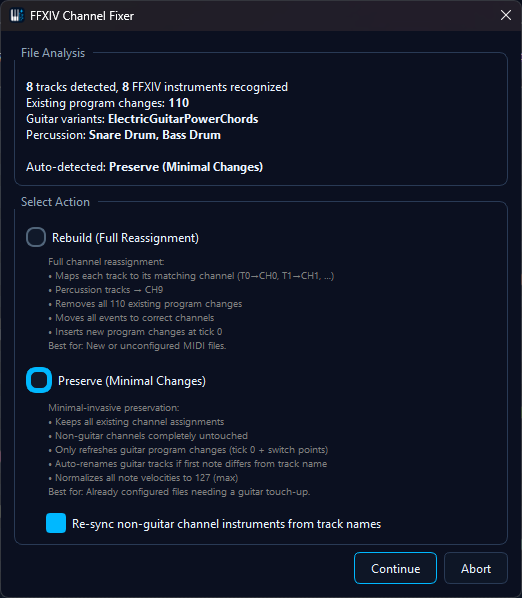
What it does - and deliberately does not do:
- Only mismatched channels are touched - a channel whose program already matches its track name is left byte-identical
- Only the program change at tick 0 is rewritten - instrument switches you placed later in the song survive
- Running the fixer again changes nothing - once names and programs agree, repeated Preserve runs with the option enabled are no-ops
- Percussion and the drum channel are never touched - the drum instruments follow their track names at playback; Timpani (a tonal instrument) is re-synced like any melodic track
- Shared channels follow the playing track - when several tracks point at one channel, the track whose first note sounds earliest on that channel decides the instrument
- Tracks without notes on a channel cannot claim it - an empty or moved-away track never overwrites another track's instrument
Result Summary
After the fix completes, a structured result popup shows exactly what was changed:
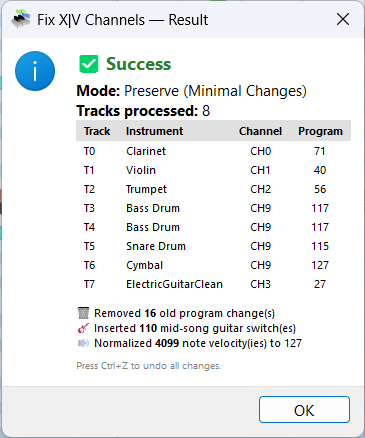
The result includes:
- Mode used - Rebuild or Preserve
- Channel mapping table - Track → Instrument → Channel → Program number
- Removed program changes - how many old PCs were cleaned up
- Guitar switches - how many mid-song variant switches were inserted
- Velocity normalization - how many notes were set to maximum velocity
- Track renames - any guitar tracks auto-renamed to match their actual variant
- Guitar notes on other channels (Preserve) - guitar notes that sit on a channel without a guitar program, for example the Flute's, get no switch program change; the result lists them with their track and channel so you can move them onto a guitar channel
Before & After
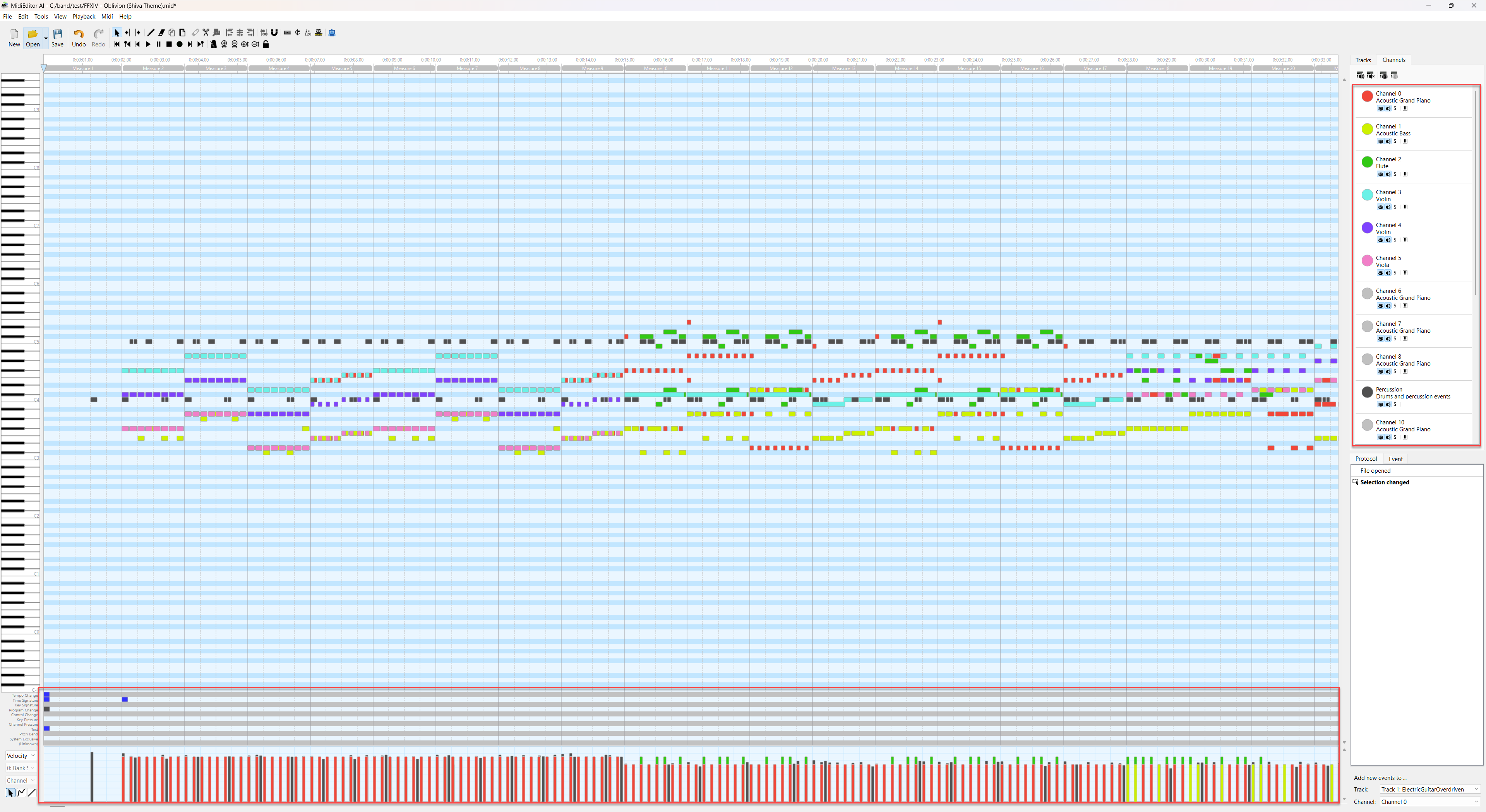
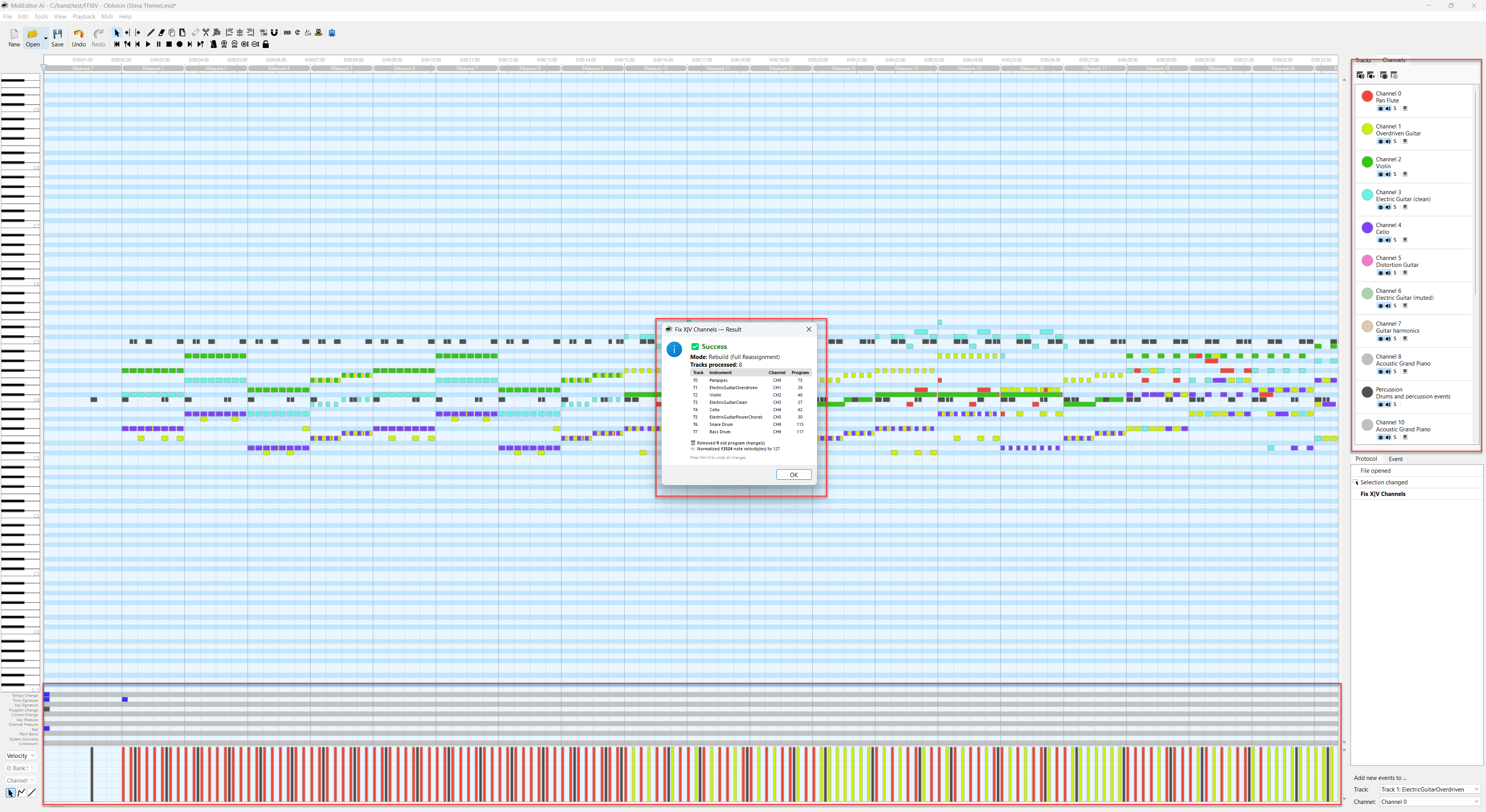
Rebuild Mode Demo
Preserve Mode Demo
Supported Instruments
The fixer recognizes all FFXIV Bard Performance instruments by track name. Track names must match exactly (case-sensitive).
Octave suffixes like +1 or -2 are automatically stripped.
| Category | Instrument | GM Program | Channel Rule |
|---|---|---|---|
| Keyboard | Piano | 0 | Track index |
| Harp | 46 | Track index | |
| Wind | Fife | 72 | Track index |
| Flute | 73 | Track index | |
| Oboe | 68 | Track index | |
| Panpipes | 75 | Track index | |
| Reed | Clarinet | 71 | Track index |
| Saxophone | 65 | Track index | |
| Brass | Trumpet | 56 | Track index |
| Trombone | 57 | Track index | |
| Horn | 60 | Track index | |
| Tuba | 58 | Track index | |
| Strings | Violin | 40 | Track index |
| Viola | 41 | Track index | |
| Cello | 42 | Track index | |
| Double Bass | 43 | Track index | |
| Fiddle | 45 | Track index | |
| Plucked | Lute | 25 | Track index |
| Guitar | ElectricGuitarClean | 27 | 5 shared channels with mid-song variant switching |
| ElectricGuitarMuted | 28 | ||
| ElectricGuitarOverdriven | 29 | ||
| ElectricGuitarPowerChords | 30 | ||
| ElectricGuitarSpecial | 31 | ||
| Percussion | Timpani | 47 | Track index (tonal) |
| Snare Drum | 118 | CH9 | |
| Bass Drum | 117 | CH9 | |
| Cymbal | 119 | CH9 | |
| Bongo | 116 | CH9 |
Guitar Variant Switching
FFXIV electric guitar supports 5 tonal variants that share channels via program_change events. The fixer handles this automatically:
- 5 channels reserved - Rebuild mode ensures all 5 guitar variants get a channel, even if your file only uses 1-2 variants. These reserved channels persist across saves and are recognized by Preserve mode.
- Reserved channels visible in Preserve - when you manually place notes on a reserved guitar channel (e.g. Guitar harmonics on CH6), Preserve mode detects them for auto-rename and switch-point insertion.
- Mid-song switches - when notes jump between guitar channels, a
program_changeis inserted at the switch point - Auto-rename - in Preserve mode, if a guitar track's first note is on a different variant's channel, the track is automatically renamed to match; an octave suffix like
+1stays - Program from the track name - in Preserve mode, a guitar track that plays on a channel without a guitar program (for example a Viola track you renamed to ElectricGuitarOverdriven) gets the program of its own variant on that channel; the analysis dialog lists such tracks. An empty guitar track parked on another instrument's channel leaves that channel alone, and so does a guitar track on a channel another instrument plays on - the channel keeps that instrument, and the analysis dialog and the result list the guitar track so you can move its notes.
- Your instrument choice counts - when you give a guitar channel another variant with the channel's instrument dialog, Preserve keeps that program at tick 0 and writes the switches with it, and a guitar track that starts on that channel is renamed to match
Validation - Check FFXIV Playability
Setting the channels up is one half of the job; the other is making sure the arrangement is something a performer can actually play. Tools → Check FFXIV Playability… examines the file the way the game will play it - notes colliding on the same tick, stacked duplicates, range, track names, channel spread and voice load - and offers the matching repair for each kind of finding, this fixer among them.
👉 Full documentation: Check FFXIV Playability -
the checks and the in-game rules behind them, reading the findings list, the selection-scoped
repairs, the AI analysis, and the validate_ffxiv tool.
Undo
The entire Fix X|V Channels operation is wrapped in a single undo action. Press Ctrl+Z to revert all channel assignments, program changes, and track renames at once.
Tips
- Name your tracks correctly - the fixer identifies instruments purely by track name. Use the exact FFXIV instrument names listed above
- Run Rebuild first - for fresh files, always start with Rebuild mode to get a clean baseline
- Use Preserve for touch-ups - if you only need to fix guitar variants after manual editing, Preserve keeps everything else intact
- Split the drums first - the FFXIV Drum Split turns a GM drum track into named percussion tracks the fixer routes automatically
- Combine with MidiPilot - use "Convert this for FFXIV Bard performance" in Agent mode to compose, then Fix X|V to clean up channels
- Check afterwards - run Check FFXIV Playability once the channels are set up; it needs no AI and its findings are clickable. Ask MidiPilot to run
validate_ffxivwhen you want the same verdict inside a conversation