📂 Supported Files
MidiEditor AI can natively open six file-format families: standard MIDI, Guitar Pro tablature, MML / 3MLE text scores, MusicXML scores, MuseScore project files, and Commodore 64 SID tunes. Non-MIDI formats are converted to MIDI on-the-fly with tempo, time signature, key signature, and instrument mapping preserved - no external converter or third-party software required.
📂 Open via: File → Open (Ctrl+O). The file dialog accepts every format below. Format detection is header-based for Guitar Pro and content-based for MusicXML/MuseScore, so even misnamed extensions usually still work.
Format Overview
| Family | Extensions | Source | Conversion | Save back as |
|---|---|---|---|---|
| MIDI | .mid, .midi |
Native - Standard MIDI File | None (loaded directly) | .mid |
| Guitar Pro | .gp, .gp3, .gp4, .gp5, .gpx, .gtp |
Guitar Pro 1-8 | Tab → MIDI on open | .mid |
| MML / 3MLE | .mml, .3mle |
Music Macro Language / 3MLE text scores | MML → MIDI on open | .mid |
| MusicXML | .musicxml, .xml, .mxl |
Finale, Sibelius, MuseScore, Dorico, etc. | Score → MIDI on open | .mid, .musicxml |
| MuseScore | .mscz, .mscx |
MuseScore 3 / 4 | Score → MIDI on open | .mid |
| Commodore 64 / SID | .sid |
C64 SID tunes (PSID / RSID) | SID → MIDI on open | .mid |
⚠️ Import converts to MIDI: opened files are converted to MIDI in memory and the original Guitar Pro / MML / MusicXML / MuseScore / SID document is never modified. For notation, MidiEditor AI can export to MusicXML (File → Export MusicXML…) - openable in MuseScore, Finale, Sibelius and Dorico. Because MIDI doesn't store notation, the score is reconstructed (note values, rests, ties, chords, key spelling) rather than round-tripped byte-for-byte.
💾 Saving an imported file: these formats can only be read, not written back - a MIDI editor saves Standard MIDI bytes, which a .sid, .gp5 or .musicxml can't hold. So pressing Save (Ctrl+S) on a freshly imported file shows a short notice and opens Save As instead, pre-filled with the original song name and a .mid extension - your original file on disk is never overwritten. Once it has been saved as .mid, Save works normally from then on.
🎵 MIDI
The native format. Loaded and saved directly without conversion.
| Extensions | .mid, .midi |
|---|---|
| Type | Standard MIDI File (SMF) format 0 and format 1 |
| Tracks | Up to 32, mapped to 19 channels (16 standard + 3 meta) |
| Editing | Full read/write - everything MidiEditor AI does ultimately works on MIDI in memory |
🎸 Guitar Pro (GP1-GP8)
MidiEditor AI natively opens every Guitar Pro format released between 1993 and 2024. Files are converted to MIDI on-the-fly with tempo, time signature, key signature, tuning, and instrument mapping preserved.
Supported GP Formats
| Format | Extensions | Version Range | Parser | Encoding |
|---|---|---|---|---|
| GP1 | .gtp |
v1.0 - v1.04 | Gp12Parser | Binary (DOS, French header “GUITARE”) |
| GP2 | .gtp |
v2.20 - v2.21 | Gp12Parser | Binary (DOS, adds triplet feel, repeats, capo) |
| GP3 | .gp3 |
v3.00 | Gp345Parser | Binary |
| GP4 | .gp4 |
v4.00 - v4.06 | Gp345Parser | Binary (adds lyrics, RSE, key signatures) |
| GP5 | .gp5 |
v5.00 - v5.10 | Gp345Parser | Binary (adds RSE2, extended note effects) |
| GP6 / GPX | .gpx |
v6.x | Gp678Parser | BCFZ-compressed GPIF XML |
| GP7 / GP8 | .gp |
v7.x - v8.x | Gp678Parser | ZIP-packaged GPIF XML |
A Brief History of Guitar Pro
.gp3) with multi-track support, tempo changes, and text annotations.
.gpx.
.gp.
.gp extension.
Header-Based Format Detection
MidiEditor AI does not rely on the file extension to determine the GP format. Instead, it reads the magic bytes at the start of each file:
| Family | Detection Method |
|---|---|
| GP1 / GP2 | Header string: FICHIER GUITAR PRO v1 or v2 (French) |
| GP3 / GP4 / GP5 | Header string: FICHIER GUITAR PRO v3, v4, or v5 |
| GP6 (BCFZ) | Magic bytes: BCFZ at offset 0 |
| GP7 / GP8 (ZIP) | ZIP header PK\x03\x04 containing Content/score.gpif |
What Gets Converted
🎵 Notes & Tabs
String/fret tablature is converted to MIDI note numbers using the track’s tuning. Note velocity, duration, and timing are preserved.
⏱️ Tempo
Tempo changes (BPM markers) are inserted as MIDI tempo meta events at the correct tick positions.
🎼 Time Signature
Time signature changes (e.g., 4/4 → 6/8) are extracted per measure and inserted as MIDI time signature meta events.
♭ Key Signature
Key signature markers (GP4+) are converted to MIDI key signature meta events with correct sharps/flats and major/minor mode.
🎸 Instruments
Guitar Pro instrument assignments are mapped to General MIDI program numbers. Track names are preserved. Each track gets its own MIDI channel.
🎤 Effects
Bends, slides, hammer-on/pull-off, vibrato, and harmonics are converted to MIDI pitch bend and controller events where possible.
Parser Architecture
| Parser | Formats | Approach |
|---|---|---|
| Gp12Parser | GP1, GP2 | Sequential binary reading of DOS-era format. Ported from TuxGuitar’s Java reference implementation (GP1InputStream, GP2InputStream). |
| Gp345Parser | GP3, GP4, GP5 | Inheritance chain: Gp3Parser → Gp4Parser → Gp5Parser. Each subclass adds version-specific fields. |
| Gp678Parser | GP6, GP7, GP8 | First decompresses the container (BCFZ or ZIP), then parses the GPIF XML document. DOM-based XML traversal extracts scores, tracks, bars, voices, beats, and notes. |
Guitar Pro Tips
- Large files: GP files with 200+ measures import in under a second. The parser is single-pass and lightweight.
- Missing instruments: If a Guitar Pro instrument has no GM equivalent, it falls back to Acoustic Grand Piano (program 0). You can reassign it manually in the Track Editor.
- Drum tracks: Guitar Pro drum tracks are mapped to MIDI Channel 9 with GM percussion mapping.
- Effects accuracy: Bends and slides are approximated using MIDI pitch bend. Complex GP effects like palm muting or natural harmonics have no direct MIDI equivalent and are omitted.
- Repeat sections: Repeat markers in GP2+ files are unrolled during import - the resulting MIDI contains the fully expanded arrangement.
📝 MML / 3MLE
MML (Music Macro Language) is a compact text notation that writes melodies as letters, octave shifts, and length numbers. MidiEditor AI imports both plain MML and the 3MLE multi-track project format, converting the text score to MIDI on open.
| Extensions | .mml, .3mle |
|---|---|
| Type | Music Macro Language text score · 3MLE multi-track project |
| Format detection | Files ending in .3mle, or text containing a [Settings] section, are read as 3MLE; everything else is read as plain MML |
| Parser | MmlImporter → MmlConverter / ThreeMleParser → MmlMidiWriter (shared SMF writer) |
What Gets Imported
🎵 Notes & Octaves
Note letters, octave shifts, and length numbers are converted to MIDI note numbers with the correct pitch and duration.
🎼 Tracks
Each 3MLE track becomes its own MIDI track and channel. Plain MML is read as a single voice.
⏱️ Tempo
Tempo commands are converted to MIDI tempo meta events at the correct tick positions.
🎼 MusicXML
MusicXML is the de-facto interchange format for music notation. MidiEditor AI imports plain XML scores (.musicxml, .xml) and the compressed container variant (.mxl) used by most notation programs to ship a score in a single file.
| Extensions | .musicxml, .xml, .mxl |
|---|---|
| Spec | MusicXML 3.x and 4.0 |
| Source apps | Finale, Sibelius, MuseScore, Dorico, Notion, Capella, NoteFlight, Flat.io, ScoreCloud, … |
| Container | .musicxml / .xml = plain XML · .mxl = ZIP container with embedded score |
| Parser | MusicXmlImporter → XmlScoreToMidi (shared SMF writer) |
What Gets Imported
🎼 Parts & Voices
Each <part> becomes a MIDI track. Multiple voices inside a staff are merged onto the same channel with correct timing.
🎵 Notes & Chords
Pitch (step + alter + octave), duration, and chord groupings (<chord/> tag) are converted to simultaneous MIDI NoteOn events.
⏱️ Tempo
<sound tempo="..."> directives become MIDI tempo meta events at the correct tick.
🎼 Time / Key Sig
<time> and <key> elements become time-signature and key-signature meta events.
🎷 Instruments
<midi-program> and <midi-channel> assignments are honoured. Falls back to GM Piano when missing.
📝 Tuplets & Rests
<time-modification> ratios are applied to durations. Rests advance the cursor without emitting notes.
MusicXML Tips
- Compressed vs plain:
.mxlis just a ZIP wrapper around.musicxml- pick whichever your notation app exports more easily. - Lyrics:
<lyric>elements are not yet imported as MIDI text events. Use the Lyric Editor to add lyrics after import. - Articulations & dynamics: Slurs, staccato, and dynamic markings are notation-only concepts; they do not currently translate to MIDI velocity changes.
- Repeat sections: Repeat barlines and voltas are not yet expanded - the imported MIDI contains a single linear pass through the score.
- Export back to MusicXML: MidiEditor AI can also write a score out - see Exporting to MusicXML below.
Exporting to MusicXML
MusicXML is a two-way street: File → Export MusicXML… writes the current song as a MusicXML score. One export covers the whole notation ecosystem - the file opens in MuseScore, Finale, Sibelius and Dorico (so there's no separate MuseScore export needed).
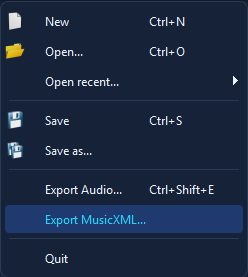
File → Export MusicXML…
Because MIDI stores no notation, the score is reconstructed from the notes rather than round-tripped byte-for-byte. MidiEditor AI derives:
- per-track parts, measures from the time signature, and a clef per part;
- note values (incl. dotted) and rests so every measure is complete;
- ties for notes crossing a barline, and chords for same-onset notes;
- enharmonic spelling from the key signature (sharps in sharp keys, flats in flat keys);
- tempo, time and key signatures.
ℹ️ Export scope: one voice per part (overlap beyond chords is clipped to mono), a 1/16-note grid (triplets are approximated as tied notes), and plain .musicxml output. The goal is a correct, openable score everywhere - not publication-perfect engraving, which MIDI doesn't carry enough information for.
🎻 MuseScore
MidiEditor AI reads MuseScore 3/4 project files directly, without going through MuseScore. .mscz is the standard zipped container; .mscx is the underlying plain XML.
| Extensions | .mscz, .mscx |
|---|---|
| MuseScore versions | 3.x and 4.x |
| Container | .mscz = ZIP with the .mscx + assets · .mscx = plain XML |
| Parser | MsczImporter → XmlScoreToMidi (shared SMF writer) |
What Gets Imported
🎼 Parts & Staves
Each MuseScore <Part> → one MIDI track. Multi-staff parts (e.g. piano grand staff) are merged.
🎵 Voices
All voices inside a staff are merged onto the part’s channel, preserving tick positions.
🎶 Chords & Rests
<Chord> elements with multiple <Note> children become simultaneous MIDI notes. <Rest> advances the cursor.
📐 Tuplets & Dotted Notes
Tuplet brackets and dotted-note durations are computed correctly using MuseScore’s <actualNotes> / <normalNotes> ratio.
⏱️ Tempo / Time / Key
<Tempo>, <TimeSig>, <KeySig> become MIDI meta events.
🎹 Grace Notes
Grace notes are inserted as short events immediately before the principal note.
MuseScore Tips
- .mscz vs .mscx: Both are supported.
.msczis what MuseScore saves by default;.mscxis mainly used for diff-friendly version control. - MuseScore 3 vs 4: Both schemas are handled by the same parser. Differences are minor and gracefully fall back to defaults when an element is missing.
- Linked parts & instruments: MuseScore’s
<Instrument>→<program>mapping is used; otherwise GM Piano. - Lyrics, fingerings, and notation extras: Like MusicXML, these are not yet converted to MIDI. Lyrics can be added via the Lyric Editor after import.
- One-way: Saves back as MIDI only.
Workflow: Score → FFXIV Bard
A common use case is converting Guitar Pro / MusicXML / MuseScore source material into FFXIV Bard Performance MIDI files. The workflow is identical regardless of source format:
1️⃣ Open Source File
File → Open and select your .gp5, .musicxml, .mscz, or any other supported format. Tracks, notes, and tempo are imported automatically.
2️⃣ Review Tracks
Check imported tracks in the Track Editor. Rename, delete, or rearrange as needed. Source track names are preserved.
3️⃣ Fix Channels
Click Fix X|V Channels  to set up the FFXIV channel mapping, program changes, and guitar variant switching automatically.
4️⃣ Save as MIDI
Save with File → Save As (.mid). The file is now ready for MidiBard2 or other FFXIV performance tools.
💡 Tip: You can also ask MidiPilot to help: “Convert this import for FFXIV 8-player ensemble, constrain range to C3-C6, make all tracks monophonic”
General Tips
- One-way conversion: Imported files become MIDI in memory. Editing and saving keeps the result as
.mid- the original file is never overwritten. - Header detection: File extension is a hint, not a hard requirement. Misnamed files are usually still recognized correctly.
- After import: The result is a standard MIDI file. All MidiEditor AI tools (Split Channels, Explode Chords, MidiPilot AI, FFXIV Channel Fixer, Lyric Editor, etc.) work on the imported data.
- Notation-only data: Articulations, dynamics, slurs, and other purely notational markings are not yet converted to MIDI velocity / controller changes. Future versions may add this.
- Lyrics: Embedded lyrics are not yet pulled into MIDI text events. Use the Lyric Editor to add lyrics after import.