 Split Channels to Tracks
The Split Channels to Tracks tool converts a single-track multi-channel MIDI file (Format 0) into one track per channel (Format 1 style). This is essential for working with GM MIDI files downloaded from the internet, where all instruments are crammed into a single track - making it impossible to hide, solo, recolor, or edit individual instrument parts.
💡 Find it in: Toolbar button or menu Tools → Split Channels to Tracks | Shortcut: Ctrl+Shift+E
How It Works
Select the source track (the current edit track), then run the tool. It scans all 16 MIDI channels, identifies which channels have events on that track, and creates a separate track for each active channel. Track names are automatically derived from GM Program Change events.
1️⃣ Analyze
Scans channels 0-15 for events on the source track. Counts notes and reads the first Program Change to identify the instrument.
2️⃣ Preview
Shows a dialog with a table of all active channels, their program numbers, GM instrument names, and note counts.
3️⃣ Split
Creates a new track for each channel and moves all events from the source track to their corresponding channel track.
4️⃣ Clean up
Optionally removes the now-empty source track. The entire operation is a single undo action (Ctrl+Z).
The Split Dialog
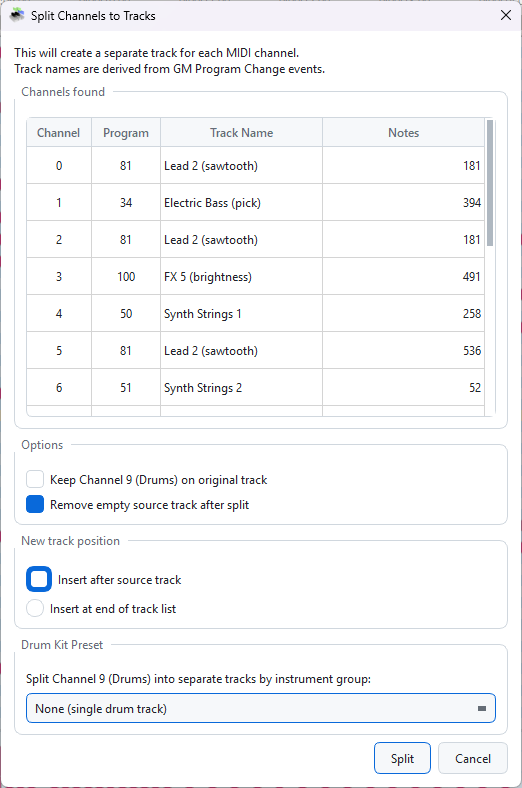
The Split Channels dialog showing a preview of all active channels with instrument names
The dialog shows:
- Channel - MIDI channel number (0-15)
- Program - GM program number, or "Drums" for channel 9
- Track Name - Auto-detected instrument name from the GM program table
- Notes - Number of note events on that channel
Options
| Option | Default | Description |
|---|---|---|
| Keep Channel 9 (Drums) on original track | Unchecked | When checked, drum events stay on the source track instead of getting their own track. Useful if you want to keep drums with meta events. |
| Remove empty source track after split | Checked | Deletes the original track if no events remain on it after the split. Source tracks with meta events (tempo, time signature) are preserved automatically. |
| Insert after source track | Selected | New tracks are inserted immediately after the source track in the track list. |
| Insert at end of track list | - | New tracks are appended at the bottom of the track list. |
Result
Splitting a single-track GM file into separate instrument tracks
After splitting, each instrument gets its own track with a descriptive name (e.g., "Synth Bass 1", "Vibraphone", "Drums"). You can now hide, solo, mute, recolor, and edit each instrument independently.
Automatic Track Naming
Track names are determined automatically based on:
| Channel | Naming Strategy |
|---|---|
| Channel 9 | Always named "Drums" |
| Channels with Program Change | Named using the GM instrument table (e.g., program 38 → "Synth Bass 1") |
| Channels without Program Change | Named "Channel N" (fallback) |
Tips
- Undo: The entire split is a single undo action - press Ctrl+Z to revert everything.
- Source track selection: The tool operates on the current edit track (shown in the "Add new events to..." dropdown at the bottom of the editor).
- Multiple tracks: If your file already has multiple tracks, run the tool on each one separately.
- Meta events: Tempo and time signature events live on the meta channel - the source track is preserved if it still contains meta events, even with "Remove empty source track" checked.
- Works great with Fix X|V: After splitting, you can use Fix X|V Channels to set up the FFXIV channel mapping for each track.