Tools Menu
|
Current tool... This menu contains a list of all available tools which can be selected for editing the file's content inside the event view (see below for details of the individual tools). |
|
 |
Standard tool The standard tool combines all tools and is able to perform most actions needed to edit Midi data. |
 |
Select single Events This tool can be used to select or deselect single events. |
 |
Select Events (Box) This tool can be used to draw a box around events to select or deselect them. |
 |
Select all Events on the left side Select all events occuring before a given time. |
 |
Select all Events on the right side Select all events occuring after a given time. |
 |
Move Events (all directions) Move all selected events in both directions. |
 |
Move Events (Left and Right) Move all selected events left and right. |
 |
Move Events (Up and Down) Move all selected events up and down. |
 |
Change the duration of the selected event Change the duration of all selected notes. |
 |
Create new Events Add new events to the file. |
 |
Eraser (remove events) Remove events from the file. |
|
Remove selected events Remove all currently selected events. |
 |
Align left Makes all selected events start at the same time. This time is equal to the start time of the leftmost selected event. |
 |
Align right Makes all selected events end at the same time. This time is equal to the end time of the rightmost selected event. |
 |
Equalize Makes all selected events have the same duration as well as the same start and end times. The new duration is equal to the average duration of the selected events. |
 |
Quantify selection Quantifies all selected events. After quantization, the events will have exact notelengths (quarters, 8ths etc.). Also their timing inside the measure will be exact. The smallest fraction (i.e. the smallest duration of the notes) can be specified using the menu "Quantization fractions" (see below). Click here for details |
|
Quantization fractions Set the smallest note duration for the quantization. Click here for details |
|
|
Quantify tuplet... As tuplets cannot be quantified with the above explained tools, select the notes which belong to the tuplet and click "Quantify tuplet...". A dialog will popup which lets you enter details for the tuplet quantization. Click here for details |
|
|
Repeat tuplet quantization Select the notes belonging to a tuplet. Click this menu item in order to quantify the tuplet with the last entered properties (using the menu item above). Click here for details |
|
|
Add track Adds a new, empty track to the Midi file. Click here for details |
|
|
Remove events from channel... Removes all events which are currently assigned to a specified channel.Click here for details |
|
|
Move events to channel... Assigns all selected events to the specified channel. Click here for details |
|
|
Move events to track... Assigns all selected events to the specified track. Click here for details |
|
|
Transpose selection... Transposes selected events up or down, based on semitone numbers entered by the user in the opening dialog. |
|
|
Set file duration Set the song's duration in milliseconds. If the entered duration is smaller then the current duration, everything beyond the new end of the file will be removed. |
|
|
Scale events Scales the timing of all selected events. |
|
 |
Magnet Enables or disables the magnet. The magnet can be used to align moved, scaled, or newly created events to the specified raster. Click here for details |
 |
Edit Tempo Allows changing the tempo within a song - instantly, or as a smooth transition with a choice of curves (Linear / Ease-in / Ease-out / S-curve). Click here for details |
 |
Edit time signatures Allows changing the meter within a song. Click here for details |
 |
Add or remove measures Allows to add or remove measures. Click here for details |
 |
Fix X|V Channels One-click deterministic FFXIV channel fixer. Choose between Rebuild (full reassignment) or Preserve (minimal changes) mode. Shows a rich result summary with channel mapping table, program change statistics, and track renames. The entire operation is wrapped in a single undo action. Click here for details |
 |
FFXIV drum split Splits a GM drum track into the named FFXIV percussion tracks (Bass Drum, Snare Drum, Cymbal, Bongo) that the channel fixer then routes automatically. The kit mapping is editable, with an audio preview for auditioning a hit before committing. The whole split is a single undo action. - dedicated reference page. |
 |
Check FFXIV Playability… Examines the file the way the game will play it and lists what would go wrong - chords and stacked duplicate notes on a monophonic performer, notes outside C3-C6, track names matching no FFXIV instrument, channel spread, empty instrument tracks and the voice load. Each check can be switched off individually. Click a finding to select its notes in the editor, double-click to jump there with only that track shown, and use the buttons for the matching repair. The window stays open and re-checks after every change. - dedicated reference page. |
 |
FFXIV SoundFont Mode toggle Toolbar button that turns FFXIV SoundFont Mode on or off in a single click, mirroring the checkbox under MIDI Settings → FluidSynth → FFXIV SoundFont Mode. Shows  (highlighted) when active and
when off.
On enable: snapshots the currently active non-FFXIV SoundFont selection, then activates the
FFXIV bard SoundFont - if no FFXIV SoundFont is installed locally, the
Download SoundFonts dialog opens automatically so it can be fetched in one step.
On disable: restores the snapshotted SoundFonts, falling back to Microsoft GS Wavetable Synth
if the FluidSynth stack is empty.
Click here for details
(highlighted) when active and
when off.
On enable: snapshots the currently active non-FFXIV SoundFont selection, then activates the
FFXIV bard SoundFont - if no FFXIV SoundFont is installed locally, the
Download SoundFonts dialog opens automatically so it can be fetched in one step.
On disable: restores the snapshotted SoundFonts, falling back to Microsoft GS Wavetable Synth
if the FluidSynth stack is empty.
Click here for details
|
 |
Split Channels to Tracks Splits a single-track multi-channel MIDI file into one track per channel. Automatically names tracks from GM Program Change events (e.g. "Acoustic Piano", "Drums"). Configurable options for drum handling, source track removal, and track insertion position. The entire operation is wrapped in a single undo action. Click here for details |
 |
Explode Chords to Tracks Splits polyphonic chords into separate monophonic tracks - one note per voice. Useful for preparing FFXIV ensemble arrangements where each instrument must play a single note at a time. |
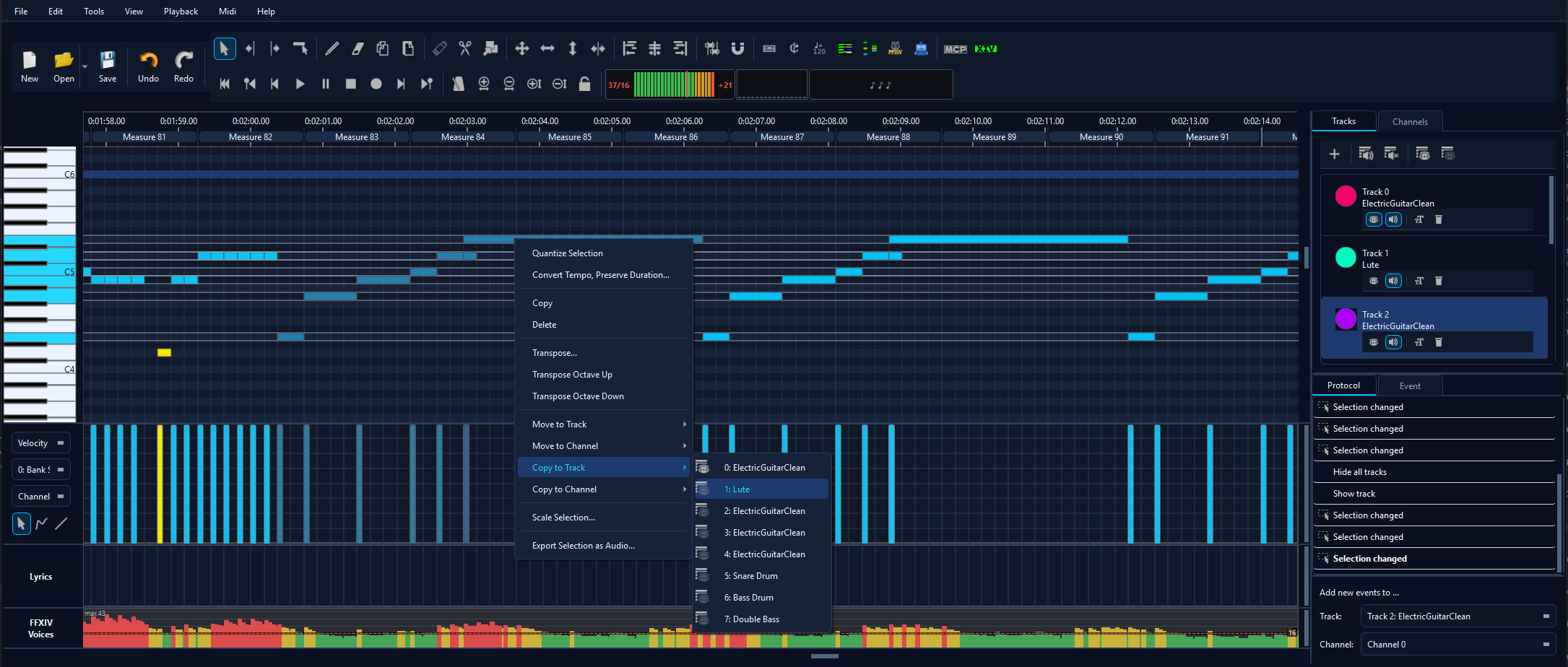 |
Copy events to track… / Copy events to channel… Duplicates the current selection 1:1 onto another track or channel (0-15) while leaving the originals in place. The new copies become the active selection so an immediate Octave Up or velocity edit only affects the duplicates. NoteOn/Off pairing is preserved; the whole action is a single undo step. Disabled when the selection is empty. Available from the matrix right-click menu as well. - full reference. |
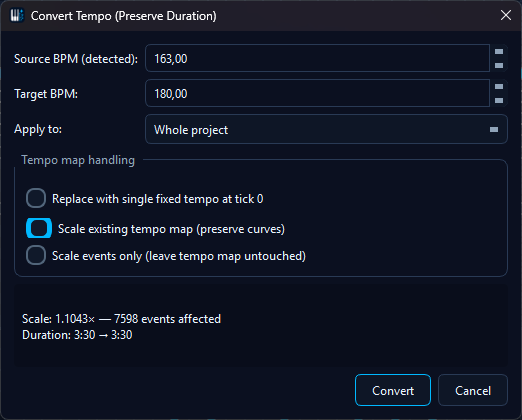 |
Tempo Tools → Convert Tempo, Preserve Duration… Time-preserving tempo conversion. Enter source / target BPM and a scope (whole file, events only, per channel, or selected events) and every event tick is rescaled by target/source while
the tempo meta is rewritten in one atomic, undoable operation. A 90 BPM vocal lined up against
a 180 BPM project keeps the same real-time playback speed. Also available from the
channel/track right-click menu. -
dedicated reference page.
|
|
Tempo Tools → Thin Tempo Map… Reduces a dense tempo map to the events that carry the timing. A tempo ramp drawn in a DAW is exported as one tempo event every few ticks, and the editor and the game read every one of them. Pick how many milliseconds the music may move - the default 2 ms is inaudible - and the preview shows how many events would survive before anything changes. That millisecond figure is counted from the file as it was opened, so running the tool again cannot move the music a second time. Notes are never touched, the file's first tempo event always stays, and the whole thinning is a single undo step. Also available by right-clicking the measure ruler above the piano roll and as the repair button on the playability check's tempo-map finding. - dedicated reference section. |
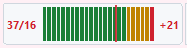 |
FFXIV Voice Limiter / Analyze Voice Load Read-only audit of simultaneous voices against the in-game 16-voice ceiling. Surfaces a per-tick voice peak, overflow ranges (where simultaneous voices > 16), and per-channel rate hotspots (passages exceeding 14 notes / sec / channel). Available as a toolbar gauge, an optional voice-load lane under the velocity strip, and the analyze_voice_load AI tool. -
dedicated reference page with thresholds, the analyser engine
and the demo video.
|
| ✂️ |
Auto-Fit Voice Load... The action counterpart to that audit, and useful in any MIDI file: it thins duplicates, over-wide chords, moments with too many simultaneous notes, and passages that run too dense - a share of the material you choose per track with a slider. Also reachable by right-clicking a note selection (scoped to exactly those notes) or, in FFXIV mode, an overflow range in the voice-load lane. Always shows a dry run first and applies as one undo step. - dedicated reference page. |
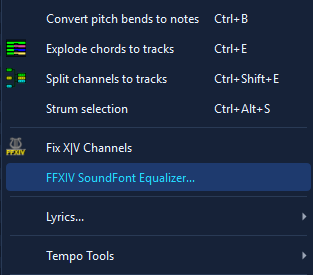 |
FFXIV SoundFont Equalizer Per-instrument volume mixer for the FFXIV SoundFont. Each row controls one bard preset (Lute, Harp, Piano, Flute, Trumpet, GM Drum Kit, electric guitars, …) with a 0 - 200 % gain slider, mute checkbox, per-row reset, and a ▶ Preview button that plays a short C-D-E-G arpeggio (or kick/snare/hat/crash for the drum kit) so you can audition the change immediately. Includes a global master gain, a curated FFXIV Default preset, and unlimited user presets persisted under FFXIV/equalizerPresets.
Slider edits affect live playback and offline audio export the moment you move them
(GEN_ATTENUATION is pushed to FluidSynth on every mixChanged).
Reachable from the Tools menu and from
Settings → MIDI I/O → FluidSynth → Open FFXIV SoundFont Equalizer…;
both entries auto-enable when FFXIV SoundFont Mode is on. -
dedicated reference.
|
|
Edit → Paste Special… When you copy from another MidiEditor AI instance and paste into a different file, Ctrl+V now opens the Paste Special dialog instead of collapsing every event onto the current edit track. Three modes: Create new tracks per source (default), Preserve source track + channel mapping (1:1), and Paste to current edit track + channel (legacy). Track creation is part of the same protocol action so a single Ctrl+Z undoes the paste and the new tracks together. Don’t ask again this session silences the modal for the rest of the session. |